你的一天,靜靜顯示。 Your day, quietly displayed.
把一部約 US$99 的電子紙裝置,變成一塊安靜的資訊顯示屏 —— 天文台天氣和警告、巴士和港鐵到站、頭條新聞。中英對照,一眼看完,一枚電池用幾個星期。
A ~US$99 off-the-shelf e-ink device becomes a calm information display: Observatory weather and warnings, bus and MTR arrivals, headlines. Bilingual, glanceable, weeks on one battery.
- 裝置 Device
- reTerminal E1002 或 E1001
- 晶片 Chip
- ESP32-S3
- 面板 Panel
- 800 × 480 電子紙 · 六色或黑白 colour or mono
- 續航 Battery
- 數星期 weeks
- 伺服器 Servers
- 零 none
- 帳戶 Accounts
- 零 none
- 授權 Licence
- 引擎及韌體 GPL-3.0
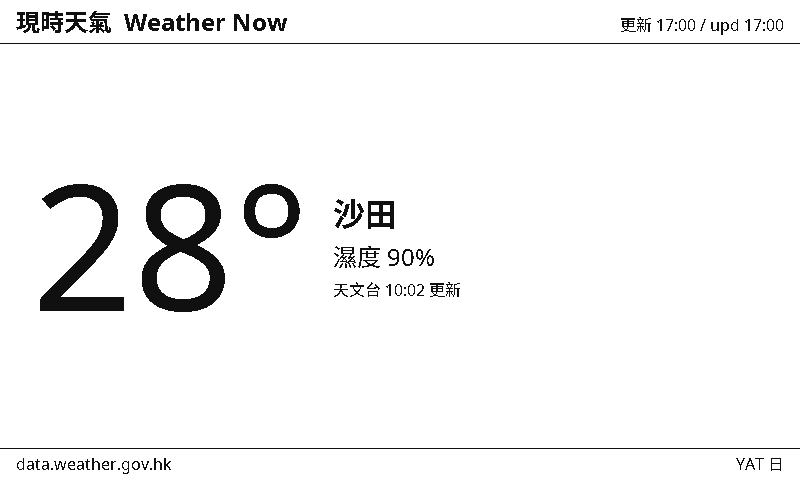
hko-now — 現時天氣 · 由香港天文台開放數據直接繪製,800 × 480,六色電子紙。
Rendered by the engine itself, not a mockup.
這是什麼What it is
沒有伺服器No server, anywhere
一版就是一個 JSON 檔案 —— 我們叫它 pack。裝置經你的 WiFi 直接向公開 API 取數,再由韌體內的引擎繪製。沒有帳戶、沒有雲端、沒有訂閱、沒有遙測;這個專案除了靜態檔案之外,什麼都不託管。
A page is one declarative JSON file — a pack — executed by an engine inside the firmware. The device talks to public APIs directly. No account, no cloud, no telemetry.
為香港而設Hong Kong first
天文台的天氣和八號風球、環保署的空氣質素、KMB / 城巴 / 港鐵的到站時間、潮汐、匯率 —— 全部是本地真實的開放數據,繁體中文和英文一齊出。香港優先,但不止於香港。
Observatory weather and typhoon warnings, AQHI, KMB / Citybus / MTR arrivals, tides, FX — real local open data, in 繁體中文 and English. Hong Kong-first, not Hong Kong-only.
開放的Open
引擎、韌體、頁面規格和全部 pack 都以 GPL-3.0 開源。你可以自己寫一個 pack,也可以把 repo 交給 AI 助手,用一句話講出你想看什麼。
The engine, firmware, pack spec and every pack are GPL-3.0 open source. Write a pack yourself — or point a coding agent at the repo and describe the page you want.
運作方式How it works
裝置一日之內大部分時間都在深度睡眠。每次醒來,它只做四件事,然後再睡。
計時器、按鍵或警告接管觸發。時鐘穿越深度睡眠繼續行走。
直接以 HTTPS 向公開 API 取數,用內建 CA 驗證,不經任何中介。
引擎解析 pack、抽取數值、排版 widget,輸出 800 × 480 的畫面。
數據無變就跳過刷新 —— 不浪費一次電子紙重繪,也不浪費電。
Wake on a timer, a button or a warning takeover → fetch over verified HTTPS → run the pack through the engine → skip the refresh entirely when the data hash is unchanged, then deep-sleep.
一個引擎,三個目標One engine, three targets
同一份 C++ 核心,編譯成裝置韌體、桌面預覽 CLI 和瀏覽器 WASM。三者渲染出來的像素完全一致 —— 你在電腦上看到的,就是螢幕上會出現的。
The same portable core builds for the device, a native CLI preview, and WebAssembly — verified pixel-identical, byte for byte.
用一句說話造一版Packs are written by agents
Pack 的規格寫得夠精確,本身就是給機器讀的。這個 repo 會自我導航:把任何編程助手指向 repo 根目錄,講出你想要的頁面就可以。
$ cd yat && claude
> "寫一版顯示西貢 69 號小巴到站時間的 pack"你需要什麼What you need
一部裝置A device
SeeedStudio reTerminal E1002(六色電子紙)或 reTerminal E1001(黑白,刷新較快)都可以 —— 兩款都是 ESP32-S3,約 US$99,現成買得到,不用改裝,燒錄頁兩款都支援。
一條 USB-C 數據線A USB-C data cable
要真的有數據線芯那一種。只能充電的線,是最常見的安裝失敗原因。
2.4 GHz WiFi2.4 GHz WiFi
ESP32-S3 無法連接只有 5 GHz 的網絡。這是最常見的設定問題。
桌面版 Chrome 或 Edge —— 只限燒錄那一次Desktop Chrome or Edge — for the flash only
燒錄經 WebSerial 進行,一部裝置一生只做一次。之後揀版和改設定全部用手機,在裝置自己的設定頁做。Safari 和手機瀏覽器做不到燒錄這一步 —— 借一部電腦用一次就可以。
沒有帳戶要開。整個流程由頭到尾,都沒有任何東西需要註冊。No accounts are created at any point — there is nothing to sign up for.